
Add pages as you go
Reading something worth keeping? Click the toolbar icon or right-click the page and choose "Add page to ePub book." Keep adding over the next few days, the list stays put between browser sessions.
 Chrome extension
Add pages to a reading list as you browse, one click from the toolbar, or the right-click menu. When you've got what you want, save the whole list as a single EPUB, one chapter per page, ready for any e-reader.
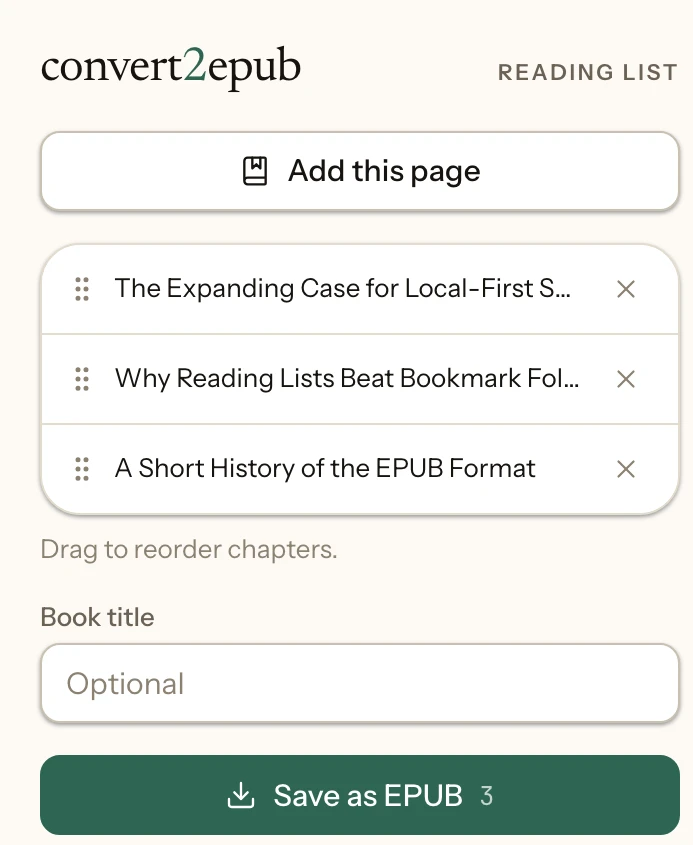
Reading something worth keeping? Click the toolbar icon or right-click the page and choose "Add page to ePub book." Keep adding over the next few days, the list stays put between browser sessions.
Drag to reorder the list, remove anything you added by mistake, and give the book a title, or leave it blank and it uses the first page's title.
One click turns the whole list into a single .epub file in your downloads, cover image included, ready for Apple Books, Kindle, or any e-reader.
Bookmarks pile up as loose links. This turns them into an actual book, with chapters, in the order you choose.
Built for the pages worth finishing later. Blog posts, essays, and documentation you'd rather read off-screen.
Cover art and in-article images are embedded in the book, so it reads like the page did, not stripped-down text.
The extension builds the EPUB locally, in your browser. There's no account, no server it talks to, and nothing about what you're reading is collected or sent anywhere.